


From Setup to 24/7 AI-Powered Communication in Minutes
See how Roomlingo combines instant translation with intelligent AI automation to transform multilingual guest communication.
How Roomlingo Works
Your complete system for intelligent, 24/7 multilingual guest communication with AI automation.
Watch how Roomlingo transforms guest communication
Create Chat Invite
Set up a multilingual chat room with your preferred languages, expiry settings, and guest details in just seconds.
Share with Guest
Share via QR code, direct link, or messaging apps. Guests can join instantly without any setup required.
Chat Seamlessly
Everyone chats in their native language. Messages are automatically translated for instant understanding.
See It In Action
Watch how a simple conversation becomes effortless communication across language barriers.
24/7 AI Assistant: Your Always-On Backup
Never miss a guest message again. Our AI automatically takes over when you're offline or outside business hours.
Set Your Support Hours
Define when you're available (e.g., 9 AM - 5 PM). AI automatically handles everything outside these hours.
Upload Your Knowledge
Add FAQs, policies, and business documents. The AI learns from these to provide accurate, helpful responses.
AI Takes Over Automatically
When you're unavailable, AI responds to guest messages instantly, keeps them engaged, and maintains service quality.
You Resume Control Seamlessly
When you're back online, you can review AI conversations and take over anytime. Toggle AI on/off for individual chats as needed.
What time does breakfast start?
2:31 AM
Breakfast is served from 7:00 AM to 10:30 AM in our main dining room on the ground floor. We offer a continental buffet with hot and cold options!
2:31 AM • AI Response
Perfect, thank you!
2:32 AM
AI responded using your uploaded breakfast policy
Two-Tier Document System
Manage both temporary updates and permanent knowledge for your AI to reference.
Quick Updates (AI Context)
Use the text area in Settings for short-term information that changes frequently.
- Current promotions & special offers
- Temporary service changes
- Seasonal updates & events
- Maintenance notices
Knowledge Library (Documents)
Upload files that contain permanent, detailed information about your business.
- FAQs & common questions
- Policies & procedures
- Service descriptions & amenities
- Use our pre-built text file templates
How AI Uses Your Documents
When guests ask questions, the AI searches your uploaded documents and context information to provide accurate, relevant answers. It combines this knowledge with natural language understanding to respond professionally in any language.
- Pro Plan: Up to 2 documents (5,000 chars each) accessible to AI per conversation
- Team Plan: Up to 5 documents (50,000 chars each) accessible to AI per conversation
Build Your AI Knowledge Base On-the-Go
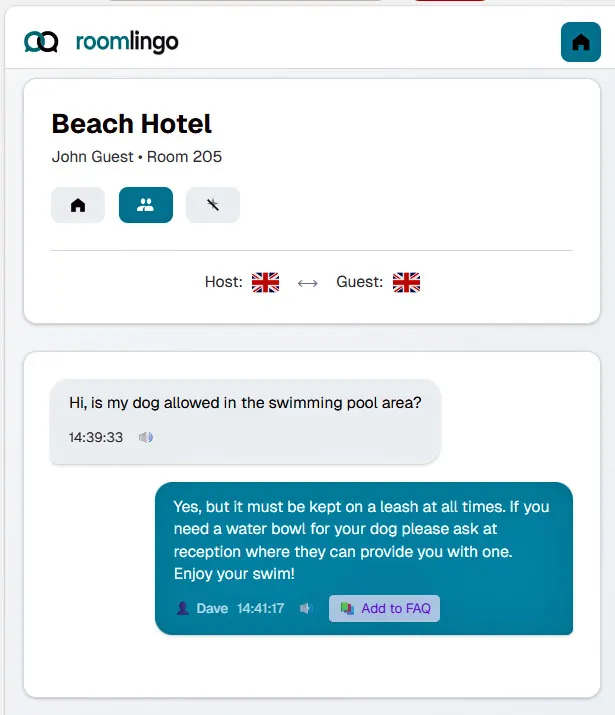
Every host reply includes an "Add to FAQ" button. With one click, any Q&A pair is instantly saved to your AI knowledge base for future use.
Capture Real Conversations
Turn actual guest questions and your answers into permanent AI training material.
No Separate Documentation
Build your FAQ organically as you chat—no need to write documentation separately.
AI Gets Smarter Instantly
Once added, the AI can use this knowledge to answer similar questions when you’re offline.
Ready to get started?
14-day free trial. Card required, but you won't be charged.
© 2025 Roomlingo. All rights reserved.